Log messages
What does the warning "State attribute definition missing" mean?
In short: The message is harmless; you don't need to do anything. WLED delivers a field for which the adapter has no description of its own. The adapter creates the state anyway. Since v0.7.1 the message only appears at the log level "debug".
This is what the message looks like:
State attribute definition missing for : <field> with value : <value>What is behind it
The adapter has a list of all WLED fields it knows. For each field, the list holds the name, the data type, the role and whether you may write the state. If a new WLED firmware brings a field that is missing from the list, the adapter creates the state like this:
- The name is the field name from WLED.
- The data type follows the value WLED delivers.
- The state is read-only. You can't write through this state.
Examples from the past are cct, n and liveseg. They came with new WLED versions and are in the list by now.
If you want to set such a field anyway, send it as a JSON command via the action state. If a field is missing for good, report it in a GitHub issue.
Older versions
Up to v0.7.0: The message appeared as a warning or error in the normal log, sometimes with the addition Sentry disabled, error caught. In v0.5.x the instance could stop afterwards. In that case, update the adapter.
Up to v0.9.2: At the level "debug", the message appears in the log again on every update from the device, over and over for the same field.
From v0.9.3: The adapter reports each missing field only once per start (#917).
See also: How do I send a complete JSON command to WLED from ioBroker? · Why does the adapter stop working after a WLED firmware update?
What do warnings about a wrong data type or a missing "val" mean when writing states?
In short: ioBroker checks every value written to a state against the state's data type. If the type doesn't match, the log shows a warning. If it comes from your script, you are writing the value in the wrong type, for example "true" as text instead of true. If it comes from the adapter itself, an update helps.
This is what the messages look like:
State value to set for "wled.0.<MAC>.<State>" has to be type "boolean" but received type "string"
State value to set for "wled.0.<MAC>.<State>" has to be one of type "string", "number", "boolean" but received type "object"
State value to set is invalid for wled.0.<MAC>.<State>: The state is missing the required property val!
The start of the log line shows who wrote the value. If it says wled.<instance>, the value comes from the adapter. If it says, for example, javascript.0, it comes from your script.
Which data type do the states expect?
| State | Type | Example |
|---|---|---|
on | boolean | true or false |
bri | number | 0 to 255 |
ps | number | 3 for preset 3 |
pl | number | 1 for playlist 1 |
transition | number | 7 |
seg.<segment>.col.0, .1, .2 | text with numbers in square brackets | "[255,0,0]" or with white channel "[255,0,0,0]" |
seg.<segment>.col.0_HEX, .1_HEX, .2_HEX | text | "#ff0000" |
action | text containing JSON | {"on":true,"bri":128} as text |
_info._online | boolean, read-only | true or false |
The adapter sets the types of on, bri, ps, pl and transition when it creates them, based on the value WLED delivers. The color states are of type "mixed" and hold the color as text. When writing, the adapter also accepts "255,0,0" without brackets.
How to write the values in the right type
In a script, pass numbers and booleans without quotes, and colors as text:
setState('wled.0.<MAC>.on', true);                  // not 'true'
setState('wled.0.<MAC>.bri', 128);                  // not '128'
setState('wled.0.<MAC>.ps', 3);                     // not '3'
setState('wled.0.<MAC>.seg.0.col.0', '[255,0,0]');  // text, not an array
setState('wled.0.<MAC>.seg.0.col.0_HEX', '#ff0000');
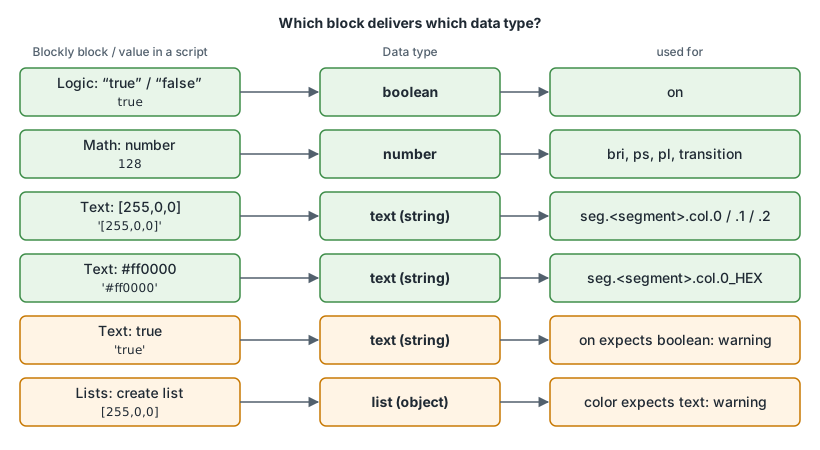
In Blockly, the block you attach to "control" or "update" decides the type:
- For
on, use the logic block "true" or "false". A text block containingtruedelivers text. - For
bri,psandpl, use the number block from "Math". A text block containing3delivers text. - For colors, use a text block with
[255,0,0]or#ff0000. A list block delivers a list, so the type "object".
Messages from the adapter itself
Up to v0.9.2: If a device can't be reached, the adapter writes _info._online as text. The log then shows State value to set for "wled.0.<MAC>._info._online" has to be type "boolean" but received type "string". You don't need to change anything; the message comes from the adapter.
From v0.9.3: _info._online is always a boolean, and the message no longer appears (#788, #794).
The message The state is missing the required property val! and type messages about states under _info such as _info.mac came from adapter versions from 2020 and 2021. Today the adapter skips empty values. If you still see these messages, update the adapter.
States that change with v0.9.3
From v0.9.3: seg.<segment>.mi (mirror segment) is a boolean and can be written (#918).
From v0.9.3: time is a number (Unix timestamp) and can be written to set the device's clock (#919). Up to v0.9.2, time is of type "mixed" and read-only.
See also: How do I write a color to WLED from a script or Blockly? · Why doesn't my script set ps or on? · What do the individual WLED states mean?
What do the errors "device not reachable" and "WebSocket was closed before the connection was established" mean?
This section is still being written.
What are the Sentry messages in the log?
This section is still being written.