Using effects and presets
How do I switch WLED presets via the state (ps) in VIS, Blockly or a script?
In short: Create the preset in the WLED web interface and write its number as a number to wled.0.<MAC>.ps, as a control command (ack=false). Whether the light turns on or off is decided by the preset itself, not by the adapter.
The adapter passes the value on to the device unchanged as {"ps":3}, via WebSocket or HTTP. The presets themselves live only in WLED. The adapter knows their numbers but not their names, and it doesn't create a list of presets.
Which presets you need
- Open the WLED web interface of the device in your browser and set color, effect and brightness the way the preset should look.
- Save the state with "Create Preset". The number under "Save to ID" is the number you will later write to
ps. Allowed values are 1 to 250. - When saving, decide whether "Include brightness" should be on. This determines whether the preset switches the light on or off (see below).
How to set ps
| Where | How |
|---|---|
| Object tree in Admin | Enter the number at wled.0.<MAC>.ps and save. |
| JavaScript | setState('wled.0.<MAC>.ps', 3); (without a third argument this is a control command) |
| Blockly | The "control" block with the object ps and the number as value. Don't use "update". |
| VIS | A widget that writes a fixed value, for example a button with the preset number, or a drop-down list with the preset numbers as values and the names as texts. |
The adapter only sends values with ack=false to the device. A value with ack=true ("update" in Blockly) counts as feedback from the device and is not sent.
ps is a state of type number. So write 3, not "3". WLED does understand the text as well, but ioBroker then logs a warning about the wrong data type.
If it worked, ps shortly afterwards shows the number the device reports back. If you then change something by hand in WLED, WLED reports -1, because no preset is active any more.
Why does the light turn on or off when the preset changes?
With "Include brightness", a preset also stores the on/off state and the brightness at the moment you saved it. If it was saved while the light was off, it switches the light off when called. If it was saved while the light was on, it switches the light on. Without "Include brightness" the light stays as it is, so it also stays off if it was off before.
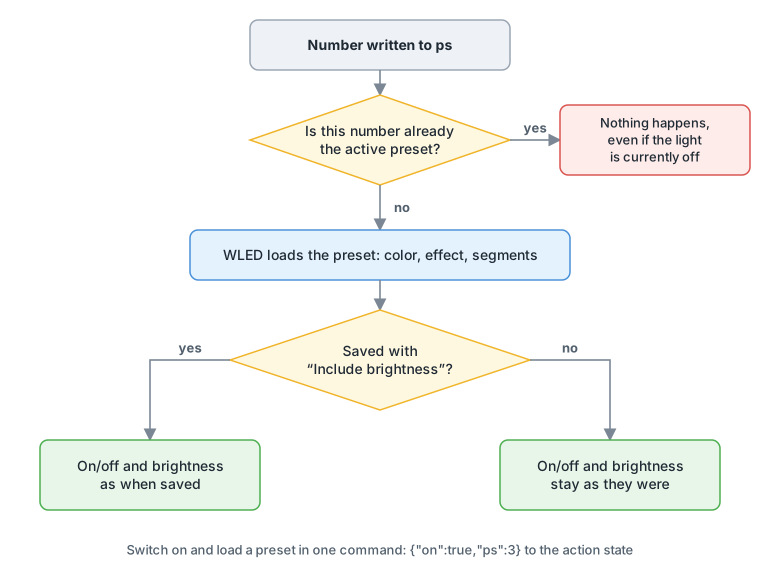
This is how you get the behavior you want:
- The preset should always switch on: save the preset again with the light on and with "Include brightness".
- The preset should only change effect and color: save it without "Include brightness" and switch the light separately via
wled.0.<MAC>.on. - Switch on and load a preset in one command: write
{"on":true,"ps":3}to the statewled.0.<MAC>.action. WLED evaluatesonbeforeps.
IMPORTANT
WLED doesn't load a preset again if it is already the active preset. This also applies if you switched the light off via on in between: ps still shows the same number, and writing the same number again does nothing. In that case, switch on with on or send {"on":true,"ps":3} via action.
TIP
To save the current state as a preset from ioBroker, write the number you want to wled.0.<MAC>.psave.
See also: Switch presets with a motion sensor · Step through presets one after another · Start a playlist · Script doesn't set ps or on · ps jumps to -1
How do I step through presets one after another with a button or a script?
This section is still being written.
How do I start a WLED playlist through the adapter?
In short: In WLED, a playlist is a preset with its own number. So you start it like any preset, by writing its number to wled.0.<MAC>.ps. The state pl only shows which playlist is currently running. Writing to it doesn't start a playlist.
Start a playlist via ps
- Create the playlist in the WLED web interface. When you save it, it gets a number like any preset.
- Write this number to
wled.0.<MAC>.ps, for example in JavaScript withsetState('wled.0.<MAC>.ps', 9);or in Blockly with "control". - While the playlist is running,
plshows its number andpsthe preset from it that is currently active. If no playlist is running,plshows the value-1.
How ps works in detail is described under Switch presets via the ps state.
Start a playlist without a saved preset via action
Through the state wled.0.<MAC>.action you can also send a playlist directly as JSON, without saving it in WLED first. This example shows presets 1, 2 and 3 for 30 seconds each, repeats this endlessly and switches the light on:
{"on":true,"playlist":{"ps":[1,2,3],"dur":[300,300,300],"transition":0,"repeat":0}}| Key | Meaning |
|---|---|
ps | The preset numbers in the order they should run |
dur | How long each preset stays, in tenths of a second (300 = 30 seconds) |
transition | Transition time to the next preset, in tenths of a second |
repeat | How often the whole playlist runs; 0 means endlessly |
end | Preset loaded after the last run; has no effect with repeat = 0 |
Advance or stop a playlist
- Jump to the next preset: send
{"np":true}toaction. This is available from WLED firmware 0.15. - Stop: set another preset via
psor change a segment directly, for example the effect. That ends the playlist.
NOTE
The adapter creates pl as a writable state. However, WLED ignores a written value; the WLED JSON API lists pl as "read-only". So use ps or action to start a playlist.
See also: Step through presets one after another · Send a complete JSON command
Where do I find the numbers and names of effects and palettes for scripts?
This section is still being written.
How do I control the "Percent" effect and show a value as a bar?
This section is still being written.
How do I change the text of the "Scrolling Text" effect or the segment name?
This section is still being written.
How do effect and palette survive a power loss, and how does WLED start afterwards?
This section is still being written.