Log messages and errors during setup
"unit not supported" / "No unit defined" error – how do I set the unit?
In short: SourceAnalytix can't find a unit it can calculate with for the datapoint, so it doesn't calculate the datapoint. From v0.7.0, the source then appears in the instance settings on the "Problems" tab with "Unit missing or not recognised". Click "Fix" there and choose the unit in which the device delivers its value.
This is what the message looks like in the log:
No unit defined for <datapoint>, cannot execute calculations !
Please choose unit manually in state configuration
Cannot handle calculations for <datapoint>, check log messages and adjust settings!
The datapoint is not calculated, and SourceAnalytix creates no states for it. The message Sorry unite type … not supported comes from old versions up to v0.4.2. Since v0.4.7, it reads No unit defined.
Where does the message come from?
SourceAnalytix uses the unit you chose for the source (from v0.7.0 in the source detail under "Unit", up to v0.6.x in the dialog at the datapoint under "Select Unit"). If that is set to "Detect automatically", it uses the unit on the datapoint's object. The message appears when neither works:
- The object has no unit. This is common for datapoints from scripts and for datapoints you created yourself.
- The unit on the object is not in the list, for example
Wattinstead ofW,m3instead ofm³, orm³/h. - The quantity is not supported at all, for example pieces, pulses, operating hours or
%. From v0.7.0, the unitspieceandpiece/mincover pieces and pulses (see Pieces and pulses).
The available units are listed in the units reference.
How to do it (from v0.7.0)
- Under "Instances", open the settings of the SourceAnalytix instance and go to the "Problems" tab. The instance must be running.
- Find the row of your source with "Unit missing or not recognised" and click "Fix".
- The "Fix unit" dialog shows which unit the datapoint reports. Under "Unit", choose the unit in which the device counts. If your gas meter delivers
m3, choosem³. If your socket delivers watts, chooseW. - Click "Apply". The setting takes effect immediately, without a restart. The log then shows
Enable SourceAnalytix for : <datapoint>with no error message, and after "Check again" the row is gone from the "Problems" tab.
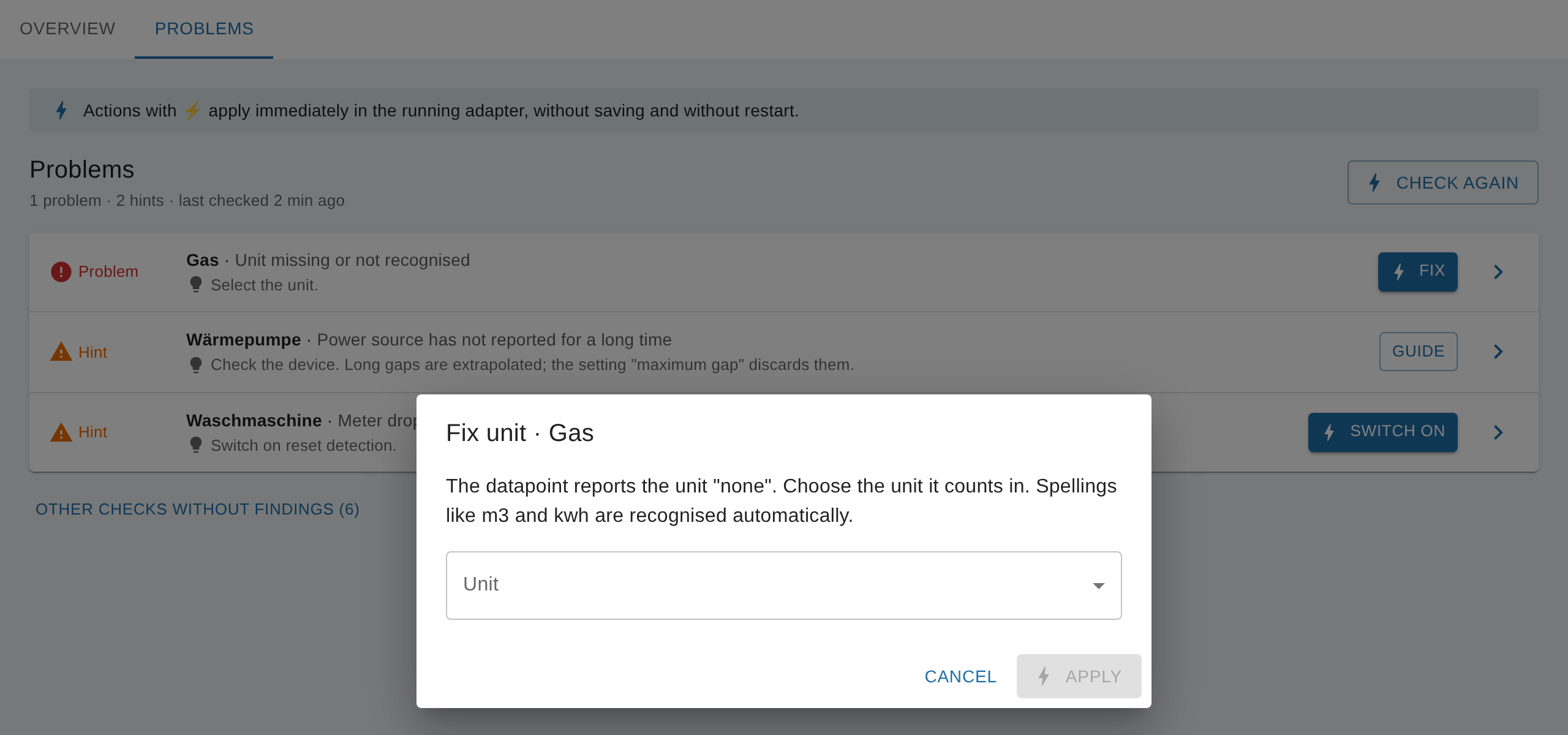
You'll find the same choice in the source detail under "Settings", in the "Unit" field. To add a new source, it's best to use "Add source": the wizard doesn't continue until a unit is chosen.
Up to v0.6.x: Open the SourceAnalytix settings of the datapoint (here's how to find them), choose the unit under "Select Unit" and save. If the dialog can't find a matching unit, it shows "No supported unit was detected. Please select a unit" and doesn't save.
IMPORTANT
Choose the unit the device delivers, not the unit you want to see. The price definition determines the unit SourceAnalytix calculates and displays in. If you choose kWh although the device delivers Wh, all values are 1,000 times too high.
If the log shows reading incorrect after conversion contact DEV instead, the unit of the datapoint doesn't match the unit of the price definition, for example kg and kWh. From v0.6.2, SourceAnalytix reports this at startup: Unit <unit> of <datapoint> cannot be converted to unit <unit> of price definition <name> (#1278). Then choose a price definition with a matching unit. From v0.7.0, the source appears on the "Problems" tab with "Unit does not match the price" in this case. Up to v0.6.1, the same message also appears when the source delivers text instead of a number (see Source delivers text instead of a number).
From v0.6.2: SourceAnalytix also recognises the spellings m3, kwh and similar on the object, and calculates with m³ or kWh (#1264). The log then shows Unit "m3" of <datapoint> is used as m³. The settings dialog also accepts these spellings under "Detect automatically" (#1278). Spelled-out names such as Watt or Liter you still have to select manually.
See also: Which units are supported (energy, volume, weight, length)? · Which unit do I set on the datapoint (kWh instead of Wh, m³ instead of liters)?
"Known valueAtDeviceReset > known cumulative value" error
In short: The stored offset (valueAtDeviceReset) is larger than the total (cumulativeReading). From v0.6.2, this is only a warning: the source keeps running, and SourceAnalytix realigns the offset itself with the next value. Afterwards, check the total and, if needed, match it to your meter with the "Align meter reading" action. Up to v0.6.1, the source doesn't start when this error occurs.
The terms total, device value and offset are explained under The terms. The rule is always: total = device value + offset.
What does the message look like?
From v0.6.2, a warning appears in the log at startup, and the second line follows with the next value from the source:
Known valueAtDeviceReset (<offset>) of <datapoint> is larger than the known cumulative value (<total>); the offset will be realigned with the next reading so the total continues from <total>
Realigned valueAtDeviceReset of <datapoint> from <old offset> to <new offset>: device value <device value>, total continues from <total>
Up to v0.6.1, it is an error, and the source doesn't start:
Check settings for <datapoint> ! Known valueAtDeviceReset : (<offset>) > known cumulative value (<total>) cannot proceed
Troubleshoot Data <datapoint> custom Data : {…}
Cannot handle calculations for <datapoint>, check log messages and adjust settings!
Where does the message come from?
The offset is stored in the datapoint's SourceAnalytix settings, and the total in the state sourceanalytix.0.<device>.cumulativeReading. When the two no longer fit together, you get this message. Typical causes:
- You lowered only
cumulativeReadingby hand or set it to 0, for example following an old guide. - The state
cumulativeReadingor the whole folder of the source was deleted. A missing total counts as 0, while the offset in the settings stays. - After a meter swap or a restore, the total and the settings come from different points in time.
Power sources (W) and other sources whose total SourceAnalytix adds up itself have no offset. They never produce this message.
How to do it (from v0.7.0)
- Under "Instances", open the settings of the SourceAnalytix instance and, on the "Overview" tab, your source.
- Compare the "Total" with your meter. If it matches, you don't need to do anything. SourceAnalytix realigns the offset itself with the next value.
- If it doesn't match, choose "Align meter reading" under "Actions", enter the reading from your meter under "What does your meter show now?" and click "Align". SourceAnalytix sets the total and the offset so they fit together, immediately and without a restart.
Until the next value arrives, the source also appears on the "Problems" tab with "Total does not match the meter". The "Align" button in that row opens the same action. The source detail shows the current offset under "For experts" as valueAtDeviceReset.
WARNING
The automatic realignment keeps counting from the stored total, even if that total is wrong. If cumulativeReading was set to 0 or deleted, the total starts at 0. In that case, match it to your meter with "Align meter reading".
Up to v0.6.1: Update to v0.6.2 or newer (see How do I update SourceAnalytix (and what is a downgrade)?). If that isn't possible, correct the total and the offset by hand while the instance is stopped, as described under Correcting wrong values in the "Up to v0.6.x" part.
See also: Correcting wrong values · Meter or device replaced · After an update or restore, values are 0
"No cost type defined" error – price definition missing
In short: Every source needs a price definition, even if you only want consumption. Its unit is the target unit SourceAnalytix calculates in. From v0.7.0, a source without a valid price definition appears on the "Problems" tab. With "Choose price", you open the source and select one under "Price definition".
What does the message look like?
If no price definition is selected for the source:
No cost type defined for <datapoint>, please Select Type of calculation at state setting
Cannot handle calculations for <datapoint>, check log messages and adjust settings!
If the selected price definition no longer exists, for example because its "Category" was renamed or deleted:
Selected Type <name> does not exist in Price Definitions
Please choose proper type for state <datapoint>
Or add price definition <name> in adapter settings
In both cases, the source is not calculated and no states are created. On the "Problems" tab, the cases are called "No price definition selected" and "Price definition no longer exists". The old message Error in case handling of cost type identification: undefined no longer exists in current versions.
How to do it (from v0.7.0)
- If you don't have a suitable price definition yet, create one in the instance settings on the "Price definitions" tab. The important part is the "Unit": it must match the source, for example
kWhfor an electricity meter or for a power value in W. Saving restarts the adapter. - Open the "Problems" tab and click "Choose price" in the source's row. The source detail opens.
- Under "Settings", choose a category at "Price definition". The list shows the unit in brackets, for example
Strom (kWh). - Click "Apply". The source starts immediately, without a restart.
If the unit of the price definition doesn't match the source, the "Problems" tab then reports "Unit does not match the price" (see Error "unit not supported" / "No unit defined"). The "Add source" wizard only offers price definitions with a matching unit and won't continue without a selection.
Up to v0.6.x: In the dialog at the datapoint, choose a category under "Select price definition" and save (here's how to find the dialog). Since v0.6.0, the dialog can't be saved without a price definition.
See also: How is a price definition structured (categories, basic fee, decimal mark)? · Assigning prices and creating your own tariffs · Costs stay 0
"Initialization failed" / "Cannot handle calculations" / "reading incorrect" messages
In short: These are catch-all messages. They only tell you that SourceAnalytix didn't start a source or couldn't calculate a value. The cause is in the log lines right before. From v0.7.0, the "Problems" tab in the instance settings shows the cause along with a suggested fix.
Messages at startup and on activation
| Message | Meaning |
|---|---|
Initialization of <datapoint> successfully | The source is running. |
Initialization of <datapoint> failed, check warn messages ! | The source was not started. The reason is in the lines before. |
Cannot handle calculations for <datapoint>, check log messages and adjust settings! | The same for a single source, right after the reason. |
Cannot handle calculations for <n> of <m> enabled states, check error messages | Summary at the end of startup: n of m sources are not running. |
Partially activated SourceAnalytix for <k> of <m> states, check error messages! | The remaining sources are running. |
[Cannot enable SourceAnalytix for <datapoint>, check settings and error messages | A source you activated or changed while running couldn't start. |
Cannot handle initialisation for <datapoint> | Follow-up message: there are no validated settings for the source. Here too, the reason is in the lines before. |
Common reasons in the lines before:
No unit defined for …: see Error "unit not supported" / "No unit defined".No cost type defined for …orSelected Type … does not exist in Price Definitions: see Error "No cost type defined".Unit … of … cannot be converted to unit … of price definition …: the unit and the price definition don't fit together, again see Error "unit not supported" / "No unit defined".Cannot use output ID … no existing output tree to keep: the technical ID you asked for is invalid or already taken, see Name, alias and output ID.- Up to v0.6.1 also
Check settings for … Known valueAtDeviceReset …: see Error "Known valueAtDeviceReset > known cumulative value".
Once you fix the cause in the settings and apply it, SourceAnalytix starts the source without a restart. The log then shows Enable SourceAnalytix for : <datapoint> with no error after it.
The "reading incorrect after conversion" message
[calculationHandler] reading incorrect after conversion contact DEV and provide these info | Reading : null | start reading {…} | stateDetails {…}Up to v0.6.1, it appears with every value if the source doesn't deliver a number (for example null, or text such as "12,5"), or if the unit of the source doesn't match the price definition, for example kg and kWh. The source keeps running but calculates nothing. Check the history of the source datapoint to see what arrived at the time of the message, and check the unit.
From v0.6.2, SourceAnalytix catches both causes beforehand: it reads numbers inside text itself, and it skips a value without a number with the warning Value <value> of <datapoint> is not a number, reading ignored (see Source delivers text instead of a number). It rejects mismatched units at startup. If the message still appears, report it as an issue in the adapter repository, with the whole log line.
See also: Datapoint enabled, but no folders appear · High CPU load and too much log output
Source delivers text instead of a number (string instead of number, decimal point)
In short: From v0.6.2, SourceAnalytix reads numbers from text itself, with a comma or a point, for example "12,5" or ".14". It can't read text with a unit or a thousands separator, for example "12,5 kWh" or "1.234,5", and skips the value with a warning. The safest option is a source datapoint of type number.
How to recognise it
- From v0.7.0, the source appears on the "Problems" tab with the hint "Datapoint delivers text instead of a number" as long as the last value is text. The "Guide" button leads here.
- From v0.6.2, if a text contains no readable number, the log shows
Value "<value>" of <datapoint> is not a number, reading ignored. That value doesn't count, but the next readable value does. - Up to v0.6.1, SourceAnalytix calculates with no text value at all. For meter readings, the log shows
reading incorrect after conversion contact DEV … Reading : nullwith every value, and the source stays without values.
From v0.7.0, SourceAnalytix also reads text with a comma or point for power sources (W), for example "1,5", just as it does for meter readings. If the text isn't a number, the log shows Value "<value>" of <datapoint> is not a number, reading ignored, and the value doesn't count (#1288).
Up to v0.6.x, SourceAnalytix only converts text for power sources if it uses a decimal point ("12.5"). With a comma, the log shows [wattToWattHour] Invalid power reading interval for <datapoint>, using current reading as new baseline with every value, and no consumption is produced.
How to switch to a number
- First check whether the source adapter has a setting for numbers or offers another datapoint with the meter reading as a number. Use that one.
- Otherwise, create your own datapoint of type "number". For example, create an alias of type number whose read function converts the text, or a script that converts the text with
parseFloatand writes it to the new datapoint. Replace the comma with a point first. - Give the new datapoint the unit in which the device counts, for example
kWh. - Set up the new datapoint as a source with "Add source".
NOTE
For SourceAnalytix, the new datapoint is a new source with its own folder. The values of the old source stay in their folder. You carry over the meter reading with start values or with "Align meter reading".
See also: Script datapoints and unreliable sources · "reading incorrect after conversion" message
Datapoint enabled, but no folders or states appear
In short: Almost always, SourceAnalytix has rejected the source, usually because of a missing price definition or unit. From v0.7.0, you can see this in the instance settings: on the "Overview" tab, the source has the status "Problem", and the "Problems" tab shows the reason and a button to fix it.
Checklist (from v0.7.0)
- Is the instance running? Without a running instance, SourceAnalytix doesn't calculate, and the overview shows "The overview needs a running instance."
- Is the source on the "Overview" tab? If not, the datapoint isn't set up for this instance, for example it is set up for
sourceanalytix.1instead ofsourceanalytix.0. Set it up with "Add source". The wizard checks the unit and price before it saves. - What status does it have? "Deactivated": open the source and choose "Activate" under "Actions". "Problem" or "Hint": continue with step 4.
- What does the "Problems" tab say? "No price definition selected", "Price definition no longer exists", "Unit missing or not recognised", "Unit does not match the price" or "Datapoint no longer exists". The button in the row fixes the problem or opens the right place.
- What does the log say? After
Enable SourceAnalytix for : <datapoint>, an error is followed by the reason, see "Initialization failed" / "Cannot handle calculations" messages. - Is "Consumption" ticked? Without the tick at "Consumption" in the source settings, no consumption values are created for day, week, month, quarter and year.
Once the source is running, SourceAnalytix immediately creates the folder sourceanalytix.0.<device>. The first values appear with the datapoint's next value. If you still don't see the folder on the "Objects" tab, reload the view and check whether a filter is active in the object list.
From v0.7.0: If you switched the source on at the datapoint on the "Objects" tab with "enabled", no price definition is selected yet. The source then appears on the "Problems" tab with "No price definition selected". Choose the price definition in its source detail and click "⚡ Apply" (#1286).
Up to v0.6.x: Check the same points in the dialog at the datapoint and in the log. Since v0.6.0, the dialog doesn't save without a price definition and unit. Old advice that you have to enter a start value no longer applies: SourceAnalytix fills empty start values itself on first activation.
See also: Where do I configure SourceAnalytix for a datapoint? · Where do I find my values (daily consumption today/yesterday)?
High CPU and memory load and too much log output
In short: SourceAnalytix calculates on every new value of every source. Sources that send very often cause most of the load. Up to v0.6.1, constant re-initialising added a permanent load, which is fixed from v0.6.2. For less log output, set the instance to log level "warn".
Reducing the load
- Update: Up to v0.6.1, SourceAnalytix rebuilds a source whenever the object of an active source changes, even if nothing actually changed. From v0.6.2, it ignores such changes and only writes objects when their definition changes (#1233).
- Send less often: Every update of the source datapoint triggers a calculation. If a device sends every second, set a longer interval in the source adapter if you can.
- Meter reading instead of power: If your device delivers a meter reading (kWh), use it instead of the power (W). See Which datapoint do I activate: meter (kWh) or power (W)?.
- Only the sources you need: From v0.7.0, you switch off sources you don't need with "Deactivate" on the source. The data stays.
Less log output
A new instance starts with log level "info". SourceAnalytix then writes several lines per source at startup. For long-term operation, "warn" is recommended: you still see warnings and errors. You set the log level on the "Instances" tab for the SourceAnalytix instance (in expert mode).
Up to v0.6.1, a source with reset detection switched off writes Cumulative reading for … decreased while reset detection is disabled at info level for every falling value. From v0.6.2, this message only appears in the debug log (#1262).
If another adapter is filling the log, for example a history adapter, its log level is what helps, not the one of SourceAnalytix.
See also: Object limit warning · Known bugs in older versions
Problems with installation and the Admin display
In short: Install SourceAnalytix from the "latest" (beta) repository, not directly from GitHub. From v0.7.0, it needs Admin 8.0.0 or newer, js-controller 6.0.11 and Node.js 22. If something is missing in Admin after installation, upload the adapter files again in the console with iobroker upload sourceanalytix.
For how to install, see Installation and creating an instance.
Installation from GitHub fails with 404 or 422
This is a problem with the ioBroker installation, not with SourceAnalytix. In the reported cases, updating js-controller helped. Installing from the "latest" repository is easier.
SourceAnalytix or its settings are missing in Admin
- No entry under "Instances": After installation, you have to create an instance.
Cannot load jsonConfig of sourceanalytix: Not existsorindex_m.html not found: Admin can't find the files of the settings page. Runiobroker upload sourceanalytixand reload the Admin page. In versions before v0.4.9, this page was missing entirely, and only an update helps.- "Overview" and "Problems" tabs empty (from v0.7.0): If they show "The overview needs a running instance." or "Sources could not be loaded", start the instance and click "Try again". While the instance is stopped, the actions are locked. You can still change and save settings.
"Not maintained" and icons of different sizes
The "not maintained" label depends on the repository you installed from. When you install from GitHub, this information is missing. Folder icons of different sizes are a display effect of Admin in the browser on a phone. Neither affects how SourceAnalytix works.
Multihost: "admin not found"
SourceAnalytix requires Admin, from v0.7.0 in version 8.0.0 or newer. If a host reports "admin not found" at startup or during installation, install or update Admin. In the reported case, Admin was missing on the host where the instance was supposed to run.
See also: What does SourceAnalytix require (Node.js, js-controller, Admin)? · How do I update SourceAnalytix (and what is a downgrade)?
Midnight: crash or day rollover at the wrong time
In short: The period rollover runs at 0:00 according to the system time of the machine or container ioBroker runs on. A crash with ENOENT at midnight comes from js-controller, not from SourceAnalytix. SourceAnalytix recovers a missed rollover itself. From v0.7.0, you can also recover it with "Recover" on the "Problems" tab.
Crash with ENOENT at midnight
At midnight, js-controller rotates the log file. If the file is missing at that moment, an adapter can crash with ENOENT. SourceAnalytix can't prevent this. What matters is that the missed rollover gets recovered.
How SourceAnalytix recovers a rollover
- At startup, SourceAnalytix checks every source and recovers a missed rollover right away.
- While the adapter is running, it also checks every hour whether a rollover is missing.
- From v0.7.0, a missed rollover appears on the "Problems" tab as "Period rollover missed". The "Recover" button recovers it for this source. The "Recover periods" action on the source does the same.
- In all versions from v0.5.5, you can also do it with the button state
sourceanalytix.0.info.recoverPeriods.
The log then shows Processing calendar rollover for <datapoint>: {…}. For more, see ioBroker was off over midnight.
From v0.6.2: If ioBroker was off over midnight, SourceAnalytix splits the consumption of the gap between the two days according to time. Up to v0.6.1, everything landed on the new day (#1260).
The day rollover happens at the wrong time
SourceAnalytix has no time zone of its own. The rollover follows the time zone of the process ioBroker runs in. If a Docker container is set to UTC, for example, the day rolls over at 1:00 or 2:00 in Germany. Set the time zone of the machine or container correctly, for Docker for example with the environment variable TZ=Europe/Berlin, and restart the container.
See also: When are values updated: live or at midnight? · Previous periods (previous states)
Object limit warning (5000)
In short: The warning comes from js-controller, not from SourceAnalytix. The adapter itself has no object limit. Every active source creates its own folder with many states. First check which options and sources you need, and only raise the limit if that number is what you want.
Fewer objects
- In the instance settings under "Main settings", the "Year statistics" section ("Weeks", "Months", "Quarters") and the "Current year" section ("Weekday", "Weeks", "Months", "Quarters", "Previous period") determine which states each source gets. If you switch an option off, SourceAnalytix removes the matching states.
- From v0.7.0, you remove sources you no longer need with the "Delete data" action, including the folder and all years.
- You can safely delete old year and week folders.
CAUTION
"Delete data" permanently removes the source's folder with all values and years. If you only want to pause, use "Deactivate".
Raising the limit
The limit belongs to js-controller. In the reported case, it could be raised in expert mode on the instance object (system.adapter.sourceanalytix.0).
See also: Which instance settings are there (periods, decimals)? · Disabling or removing a source
Source adapter or history shows 0 or old values
In short: SourceAnalytix only reads the datapoint you set up as a source, and never writes to its value. If SourceAnalytix shows 0 or old values, the source datapoint usually isn't receiving anything anymore. Zeros in the history of the source datapoint come from the source adapter or from a script.
The source adapter renamed its datapoints
If an adapter renames its datapoints after an update, the values arrive in new datapoints. SourceAnalytix keeps listening to the old ones, and its values stay where they were.
- In the instance settings, open the source and check "Last update".
- If the old datapoint is deleted, then from v0.7.0 the source appears on the "Problems" tab with "Datapoint no longer exists". The "Deactivate" button stops the source, and the data stays.
- Set up the new datapoint as a new source with "Add source" and carry over the meter reading with "Align meter reading".
- Update links in VIS or scripts to the new folder. The old folder stays as an archive.
The "Switch datapoint" action, which takes the data along to the new datapoint, is planned (#1271).
Zeros in the history of the source datapoint
SourceAnalytix only writes values to its own folder sourceanalytix.0.<device>. On the object of the source datapoint, it only changes its own settings, for example the offset, never the value. So a 0 in the history of the source datapoint is written by another adapter or a script.
See also: Datapoint enabled, but no folders appear · Disabling or removing a source